Restarting and shutting down your computer do the same thing right? Well.... not quite. Read below to learn more.
Has your computer been running slow lately? You may want to check how long its been since your computer has been restarted. To do this, follow these steps:
- Press CTRL+ALT+DELETE
- Open Task Manager
- Click "more details"

- Go to the "Performance" tab and look at up time which will display the time in days, hours, minutes, seconds.
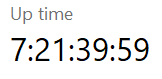
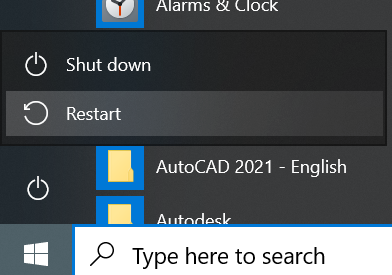
To reset this timer, you must "Restart" your computer instead of "shutting down". To restart your computer, go to the Start icon, click the power icon, then Restart:
In short, a restart is the best way to reset all services and programs on a computer to improve the speed of your computer.
To Learn More visit this resource: https://www.computroon.co.uk/2020/10/16/restart-vs-shutdown-windows-10/
Have a wonderful day!
Alex
Was this article helpful?
That’s Great!
Thank you for your feedback
Sorry! We couldn't be helpful
Thank you for your feedback
Feedback sent
We appreciate your effort and will try to fix the article